16 Green Seamless Dot Patterns
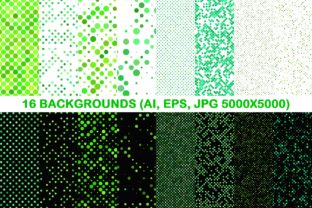
Seamless dot patterns are foundational visual assets—quietly powerful, highly adaptable, and consistently effective across design, branding, and communication workflows. The 16 Green Seamless Dot Patterns package delivers precisely that: a curated, production-ready set of 16 distinct green-based dot arrangements, each engineered for infinite tiling without visible seams or repetition artifacts. It’s not just a collection of backgrounds—it’s a workflow accelerator for anyone who builds, presents, publishes, or teaches using visual media.
Green carries strong associations with growth, clarity, balance, and sustainability—making these patterns especially useful in contexts where calm authority or eco-conscious messaging matters. But beyond symbolism, the real value lies in how cleanly and flexibly they integrate into existing tools and processes. Whether you’re preparing a client pitch deck, designing packaging for a wellness brand, building an online course interface, or updating your blog’s visual hierarchy, these patterns serve as consistent, professional-grade texture layers that require zero custom illustration time.
How These Patterns Fit Into Real Workflows
Unlike one-off graphics, seamless patterns thrive in repeat-use scenarios—where consistency, scalability, and compatibility matter more than novelty. The 16 Green Seamless Dot Patterns package supports this by delivering each design in three essential formats: vector AI, vector EPS, and high-resolution JPG (5000×5000 pixels). That means you can scale a dot pattern to cover an entire billboard in Illustrator—or drop it into Canva, Figma, or PowerPoint as a crisp background without pixelation.
For designers and marketers, this eliminates the common friction point of sourcing, resizing, and testing tileable assets mid-project. You don’t wait for a designer to generate a custom pattern when a deadline looms—you open the folder, drag in the version that matches your software and output needs, and move forward. For educators and content creators, the uniform resolution and color fidelity mean slides, handouts, and digital worksheets retain visual cohesion across devices and print runs.
Before the Project: Preparation and Selection
Start by reviewing all 16 patterns—not just visually, but functionally. Some feature tight, dense dots ideal for subtle texture overlays on product mockups. Others use larger, spaced-out dots better suited for section dividers in web layouts or presentation templates. A few include slight tonal variation within the green spectrum (e.g., sage-to-olive gradients), which adds depth without breaking seamlessness.
Organize them meaningfully: rename files with descriptive tags like “green-dot-tight-03” or “green-dot-wide-07” rather than generic “pattern_01.ai”. This pays off later when you’re scanning folders during tight deadlines or sharing assets with team members. If you use cloud storage or DAM systems, add metadata—keywords like “seamless”, “dot”, “green”, “background”, and “vector”—to support future searchability.
During Execution: Integration Across Tools and Teams
These patterns work best when treated as modular components—not decorative afterthoughts. In Adobe Creative Cloud, place the AI or EPS files directly into Illustrator or InDesign documents as linked assets. That way, if you update the master file (e.g., adjust dot size or spacing), all linked instances update automatically—critical for maintaining brand consistency across marketing collateral, sales decks, and email templates.
In non-Adobe environments—like Figma, Canva, or Google Slides—the JPG versions perform reliably. Upload once, save as a reusable asset in your team’s shared library, and apply across projects. Because each JPG is 5000×5000 pixels, it tiles cleanly even on ultra-wide displays or large-format prints. No stretching, no blurring, no manual tiling required.
For developers or product teams integrating visuals into digital products, the vector files allow precise control over scaling, color shifts (via global swatches), and responsive behavior. You can convert EPS or AI files to SVG for web use—retaining scalability while keeping file sizes minimal. Just ensure your CSS or framework respects the pattern’s natural repeat behavior (e.g., background-repeat: repeat;).
After Delivery: Maintenance and Long-Term Use
A well-chosen pattern set should age gracefully. The 16 Green Seamless Dot Patterns hold up because they avoid trends—no neon glows, no forced gradients, no dated textures. Their simplicity makes them durable across evolving brand guidelines. If your company refreshes its palette next year, you can recolor the vector files in seconds using Illustrator’s Recolor Artwork tool—keeping the same structure, spacing, and rhythm, but aligning with new primary greens.
Quality control is built in: every pattern has been tested for true seamlessness at multiple scales and export settings. Still, always verify before final output—especially when applying to complex layered compositions. Zoom to 400% in your editing software and pan across tile boundaries. If you see misalignment or tone shifts, swap to another pattern from the set. Having 16 options gives you flexibility without compromise.
Practical Implementation Tips
- Use density intentionally: Tighter dots add quiet sophistication to premium reports or luxury branding; wider dots create friendly, approachable energy for educational materials or wellness apps.
- Layer thoughtfully: Apply a green dot pattern as a subtle underlay beneath semi-transparent text blocks—not as a dominant background. This improves readability while preserving visual interest.
- Match to purpose, not preference: Don’t default to your favorite pattern. Ask: Does this support the message? Does it guide attention or distract? Does it scale appropriately for the medium?
- Test contrast early: Green-on-green combinations can blur if lightness values are too close. Use browser tools or design software’s contrast checker to confirm legibility—especially for body text over patterned areas.
- Archive smartly: Store original AI/EPS files separately from exported JPGs. Keep a README.txt with notes on usage rights, compatible software versions, and any known limitations (e.g., “Pattern 12 renders best above 150 DPI”).
Where These Patterns Interact With Other Resources
The 16 Green Seamless Dot Patterns don’t exist in isolation—they gain strength through integration. Pair them with neutral typography (like Inter, Lato, or Source Sans) to let the texture breathe. Combine them with icon sets that share similar stroke weights and proportions for visual harmony. Use them alongside photo libraries featuring natural light and organic subjects—especially for sustainability, health, or education brands—where green patterns reinforce thematic continuity.
They also complement color systems. If your brand uses a defined green palette (Pantone, HEX, or CMYK), test each pattern against those exact values. You’ll quickly identify which of the 16 offers the cleanest match—and which might need minor adjustment in vector form. That kind of precision saves hours in revision cycles.
Who Benefits Most—and Why
Freelancers appreciate the time saved: no back-and-forth with clients over “just one more background option.” Small business owners get polished, scalable assets without hiring a designer for every seasonal campaign. Educators build cohesive course materials faster—using the same pattern family across slide decks, PDF handouts, and LMS banners. Bloggers and publishers use them to unify post headers, sidebar accents, and newsletter graphics—strengthening visual recognition over time.
Even productivity-focused users benefit. A consistent, calming green dot background in your note-taking app or daily planner creates subtle environmental cues that support focus and reduce visual fatigue—without demanding attention.
Ultimately, the 16 Green Seamless Dot Patterns succeed because they remove friction—not add decoration. They fit where work happens: in the middle of tight deadlines, collaborative edits, cross-platform publishing, and iterative refinement. They’re ready when you are.